


Property Brothers Home Design
4.613.35K Reviews
App Specs
- Version
- 3.9.7g
- Updated On
- License
- Free
- Downloads
- 10,000,000+
- Developer
- Storm8 Studios
- Categories
- Simulation
- Platform
- Android
Screenshots
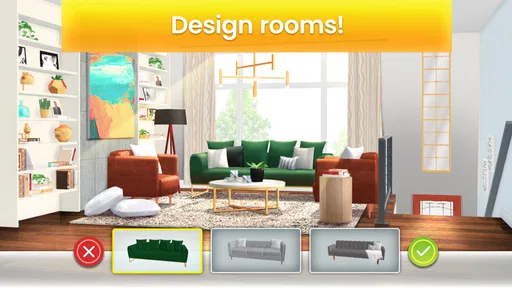
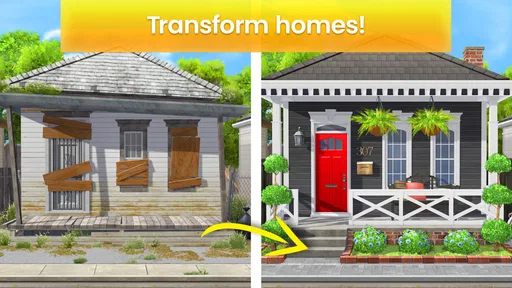
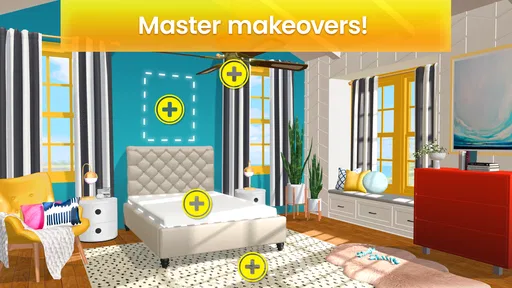
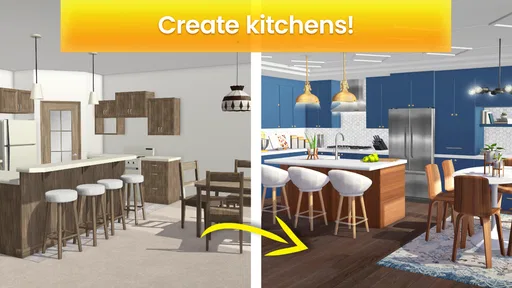

 Analysis by AppCompare
I enjoy Property Brothers Home Design most when I treat it as a relaxed design game rather than a realistic renovation planner. Its appeal is the loop between solving match-3 puzzles and using the rewards to change rooms: a puzzle gives the decorating a sense of progress, while each design choice offers a reason to tackle another level. It is a simulation game from Storm8 Studios, and the mix makes it easy to pick up for a short break without needing any experience with interior design.
Where the game stands today
The game has a 4.6 average from around 321,000 ratings, and it has been installed over 10 million times. Those figures suggest it has found a substantial audience, but they do not tell you whether its rhythm will suit you. In my view, the key question is whether you like both halves of the experience: if you only want to arrange furniture freely, puzzle levels may feel like a gate; if you want a pure match-3 game, renovation decisions may slow the pace.
It is free to download and rated Everyone, so it is approachable for a broad audience. It does include optional in-app purchases, priced from $0.99 to $99.99 per item. I would start without buying anything and see how the puzzle-to-renovation loop feels first. Paying may make sense for someone who values faster progress, but it is not a requirement to try the core experience.
What the version tells me—and what it doesn’t
Property Brothers Home Design was released on June 19, 2019, and its current version is 3.9.0.1g. That gives the game a long-running presence on mobile, but a version number alone is not a changelog. I would not assume from it that a particular room, feature, or system was recently added. What matters for a new player is that the current build is the one to judge, while returning players should check the in-game experience for changes that affect their own progress.
The game is listed for devices running Android 7.0 or later. For anyone installing it on an older phone, checking that requirement before downloading can save time. As with any mobile game, the feel can also depend on the device: a design game is most enjoyable when the rooms and furniture are easy to view, so a larger screen may be more comfortable than a small one, especially during longer sessions.
Design Dreams Meet Puzzle Play
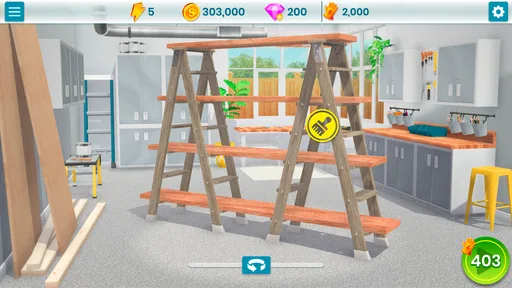
At its core, Property Brothers Home Design is a delightful mix of home renovation and puzzle-solving. You start with a fixer-upper that’s more "fix" than "upper," and your job is to turn it into a dream home. But here's the twist—you earn the cash to do this by completing levels in a match-3 puzzle game. It's like if Candy Crush and HGTV had a digital baby.
Getting Started: The Basics
When you first launch the app, you'll be greeted by the familiar faces of Jonathan and Drew. They guide you through the basics, helping you understand how to earn coins and use them to buy furniture, renovate rooms, and upgrade spaces. The tutorial is pretty straightforward, which is great if you’re not exactly a pro at match-3 games. The learning curve is gentle, so you’ll be designing in no time.
Worth Reading Before You Choose

EA SPORTS FC Mobile 26 Is a Bigger Football Game, but It Takes Time

Flipboard Shows What News Apps Must Do Beyond the Feed

Switching to Android Auto Means Rethinking Your Driving Routine

Google Calendar Makes a Crowded Week Easier to Manage

Ludo King Makes the Most of the Minutes Between Plans

Baby Panda World Brings Quick Play to Modern Phones, but Its Game Library Feels Busy
Making the puzzle loop work for you
The most useful way to approach the puzzles is to think about the renovation you are working toward, not just the board in front of you. A win supplies the currency that lets you make progress on a room, so if you have only a few minutes, finishing a level can be a satisfying stopping point. When you have more time, you can spend the earned currency on the next design step and see a visible change. That small routine makes the game easier to fit around a commute or a quiet moment at home.
I would also avoid treating every difficult level as a reason to spend. If a board takes more than one attempt, stepping away and returning later is a sensible option; the design side is meant to be enjoyable, not a deadline. The trade-off is that a player who wants to decorate continuously may have to accept the puzzle pace between choices. If you prefer a game where furniture placement is the whole activity, a dedicated interior-design sandbox is likely a better match.
The Puzzle Mechanics
The puzzles in the game are your typical match-3 mechanics with a twist. You need to match tiles to reach certain goals and earn the coins needed for renovations. I found the puzzles challenging enough to be engaging but not so hard that I wanted to throw my phone across the room. As you progress, the puzzles get more complex, which keeps things interesting.
Design choices, with a little planning
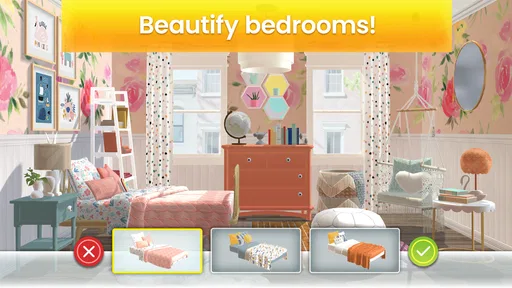
When I reach a decorating choice, I think about the room as a whole rather than picking each item in isolation. Comparing the available furniture and colors before committing helps me build a look that feels intentional, instead of making choices simply to clear the next task. It is a small habit, but it makes the renovation feel more personal and gives the visual changes a stronger payoff.
That freedom has limits: this is guided room renovation, not a professional floor-planning tool. It is useful for trying a mood or imagining how a coordinated set of choices might look, but I would not use it to plan real measurements, shop for actual furniture, or make construction decisions. For those jobs, a room-planning app with practical dimensions is more appropriate. Here, the point is the pleasure of shaping a polished scene.
Designing Your Dream Home
Now let's talk about the real fun part—designing! You get to choose from a variety of furniture styles and color schemes to make each space your own. Whether you're into modern minimalism or rustic charm, there’s something for everyone. I loved how the game lets you express your inner designer without any pressure. And the graphics? Pretty spot on. The rooms look vibrant and realistic, making the whole experience immersive.
A realistic way to fit it into the day
Imagine opening the game during a coffee break, completing a puzzle, and using the reward to make one clear change to the room before putting your phone away. That is a better fit for its structure than expecting to finish a full makeover in one sitting. On a slower evening, the same loop can stretch into a longer session, but the puzzle requirement remains part of the deal. I like that the game offers a compact sense of progress; I would skip it if I needed an uninterrupted, free-form creative session.
It is also a good choice for someone who enjoys home makeover shows but does not want the pressure of learning a complex design editor. The guided decisions keep the activity approachable, and the puzzle levels provide a familiar task between decorating moments. Players who mainly enjoy hard, strategic match-3 boards may find the renovation layer a pleasant change, though people looking for deep puzzle variety should compare it with games focused entirely on match-3 play.
Spending and pacing
Optional purchases are the main way to trade money for convenience, so I would decide on a personal spending limit before playing rather than making a rushed purchase after a frustrating level. The listed purchase range runs from $0.99 to $99.99 per item, a broad spread that makes checking each offer important. Free play is a reasonable way to find out whether the pace works for you; purchases make most sense only if you already know you want to move faster.
The game is free, but “free” does not mean every renovation step will happen at the speed you might prefer. The puzzle loop sets the pace, and waiting or replaying can be part of the experience. Ads are described as optional opportunities for extra rewards, which is a useful distinction for a player who would rather watch something than pay. I would still approach any reward prompt as a choice, not as a requirement to enjoy the game.
In-App Purchases and Ads
Of course, it wouldn’t be a mobile game without some in-app purchases and ads. You can buy extra coins if you're in a hurry to finish a renovation, but you can totally enjoy the game without spending a dime. The ads are there, but they’re not intrusive, which is a big plus in my book. You can watch them for extra rewards, which is a nice option if you’re patient and want to play for free.
What returning players should keep in mind
For someone who has played before, the current version number is a useful identifier when checking that the installed build is up to date, but it does not explain what has changed over time. I would judge a return by opening the game and seeing whether the current puzzle and renovation rhythm still appeals, rather than expecting a version label to promise new content. The release date establishes that this is an established mobile title, not evidence of any specific recent addition.
That distinction matters because expectations can drift. A returning player may hope for a particular feature or a new design direction, but it is better to evaluate what is actually available in the current game than to infer details from the number attached to it. For a first-time player, the practical question is simpler: do you want a guided makeover experience with match-3 levels as its engine?
Social play and the limits of comparison
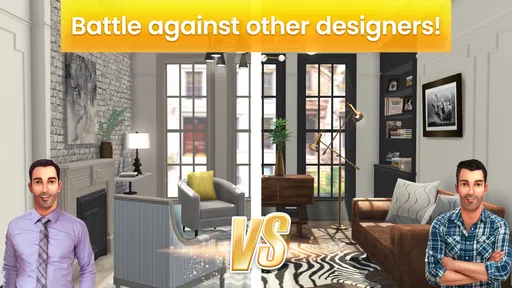
Another neat aspect is the community element. You can connect with friends, share your designs, and even visit other players' homes for inspiration. It's like a little social network for design lovers. Plus, the game regularly updates with new levels and design challenges, keeping things fresh and exciting.
Compared with a conventional match-3 game, the makeover gives each win a visible purpose beyond clearing a board. Compared with a dedicated home-design game, however, the puzzle levels make creativity less continuous. That is the central trade-off, not a flaw that can be solved by playing differently. If you want a light blend of both, the balance is appealing; if one side matters far more to you, a specialist game in that category will probably serve you better.
Who I would recommend it to
I would recommend it to casual players who enjoy choosing room styles, fans of makeover entertainment, and anyone who likes a clear reward after a short puzzle session. It is particularly suited to people who prefer guided choices over building a room from a blank canvas. The Everyone age rating also makes it an accessible option to consider for family play, though purchases are present, so it is sensible for adults to review spending settings before handing over a device.
I would steer away from it if you want realistic renovation planning, complete control over room layouts, or a game that lets you decorate without earning progress through puzzles. It is also not the best pick for someone who dislikes repeated match-3 tasks or wants every session to deliver a large amount of progress. Knowing that upfront makes the game’s structure easier to enjoy rather than frustratingly resist.
What to watch as you play
As you decide whether to keep playing, pay attention to how often you look forward to the next design choice versus how the required puzzle feels. If the room changes make the puzzle effort worthwhile, the loop is doing its job. If you find yourself wishing the puzzles would disappear, that is a clear sign that another kind of decorating game would be a better fit. I would also keep an eye on how optional purchases affect your own sense of pace and stick to the free route if that is more comfortable.
Overall, Property Brothers Home Design is a fantastic way to get your design fix without ever picking up a hammer. It's a perfect blend of creativity and strategy that keeps you coming back for more. Whether you're a fan of the TV show or just love a good puzzle, this app is definitely worth checking out. So go ahead, unleash your inner designer, and make Jonathan and Drew proud!
Pros
- Engaging puzzles with varying difficulty levels.
- Stunning graphics and realistic home designs.
- Includes tips for real-life home design ideas.
- Frequent updates with new levels and challenges.
- In-game events keep the gameplay fresh.
Cons
- Requires a stable internet connection.
- In-app purchases can be expensive.
- Some levels may feel repetitive.
- Limited customization options for some items.
- Ads can disrupt the gaming experience.
FAQs for Property Brothers Home Design
What is the main objective of Property Brothers Home Design?
Property Brothers Home Design is a mobile game that combines home renovation with puzzle-solving. Players work alongside the famous Property Brothers, Drew and Jonathan Scott, to renovate and decorate homes. The main goal is to solve match-3 puzzles to earn coins and resources, which can then be used to purchase furniture, decor, and other design elements for various renovation projects.
Are there in-app purchases in Property Brothers Home Design?
Yes, Property Brothers Home Design offers in-app purchases. While the game can be enjoyed for free, in-app purchases allow players to buy coins or boosters to progress more quickly. These purchases are optional, but they can enhance the gaming experience by providing additional resources and customization options.
Can I play Property Brothers Home Design offline?
Property Brothers Home Design requires an internet connection to download updates, access new content, and sync progress across devices. While some features may be accessible offline, an online connection ensures you have the latest updates and can fully enjoy all available features and events.
Is Property Brothers Home Design suitable for all ages?
The game is designed to be family-friendly and is suitable for players of all ages. With its combination of puzzle-solving and creative home design, it offers engaging gameplay for both young players and adults. However, parents should be aware of in-app purchases and may want to monitor spending for younger players.
How can I get help if I encounter issues in the game?
If you experience any issues with Property Brothers Home Design, you can contact the game's support team through the app. Access the settings menu and look for the support or help section. Here, you can find FAQs, troubleshooting tips, or submit a request for further assistance from the developers.


